
AnyPortrait > Forum > Bugs or Suggestions
Problem when re-importing a PSD file
- This topic has 5 replies, 2 voices, and was last updated 3 weeks, 2 days ago by
 RainyRizzle.
-
AuthorPosts
-
September 22, 2026 at 7:02 pm #1633
timblee
Hello!
When I attempt to re-import a PSD, modified or not, I end up with mesh groups being moved and I have to move them by hand every time to adjust their positions.
I’m not sure what is causing this issue as I didn’t have this problem on a previous project.
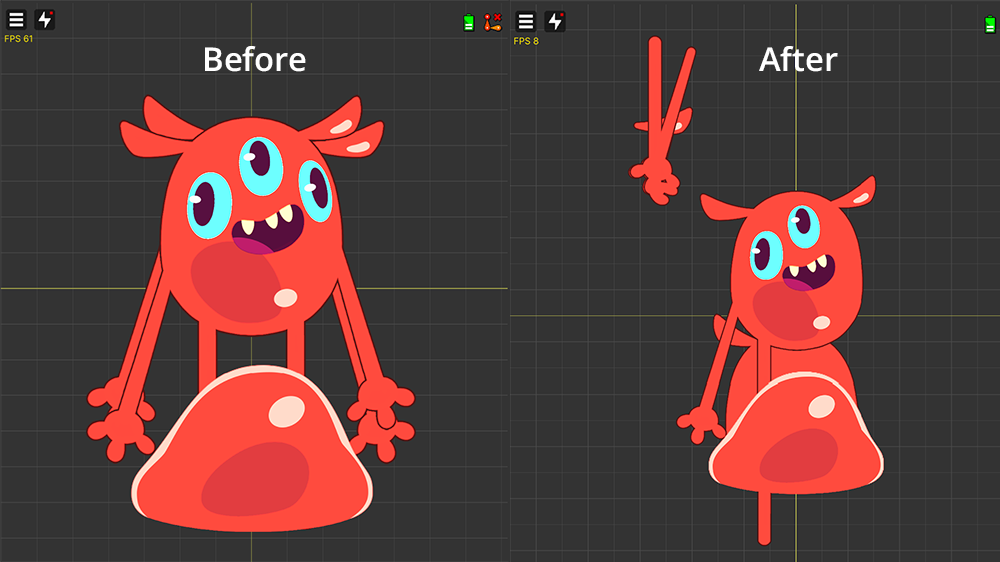
Here is some of the things I did that might have caused the issue, although I can’t be certain:
– Unlike our previous project, we had a character with multiple directions this time. I used the method were I created multiple child mesh groups, one for each direction. I also had some identical visuals between the different directions so, to gain some space on the atlas, I only imported one visual, duplicated them in AnyPortrait and moved them to their respective sub-mesh groups. Everything was working perfectly at this point.
– Then we moved all the content of the project to a new project. When I tried to re-import the PSD file, it said “invalid path”. The PSD file was exactly the same, no modification. I changed the path to the new one and made sure all the images where overlapping correctly. After baking, some mesh groups had moved and I repositioned them by hand. (I had issues with some IKs too but I can’t remember the specifics, I had to link some effector bones again. My control parameters were broken too, the keys had disappeared. But that might have been our fault)
– After making sure everything was perfect again, I tried re-importing the PSD with two new layers added to it. I made sure everything was overlapping and that the mapping was correct. After baking, the same mesh groups had moved to the same spots. (This time my effector bones were linked correctly and my control parameters did not break)
I think the issue might be coming from the fact that I duplicated some visuals in AnyPortrait, added new mesh groups and renamed some of them. Yet when I re-import the PSD file, some mesh groups end up being moved while some stay in place. For example, the right arms and legs have been duplicated in AnyPortrait and were moved. But the central and right eyes and the central and right teeth were all duplicated as well, yet only some were moved.
Should I just make a new character with all the identical visuals already present in the PSD file instead of duplicating them in AnyPortrait?
Sorry about the wall of text. I’m unsure what to do now as I will need to re-import this PSD file multiple times in the future…
Thank you in advance for any help you can offer me <3
September 23, 2026 at 9:51 am #1634 RainyRizzle
Hello!
We apologize for the delay in our response.We have confirmed that the issue you reported is a bug that occurs when re-importing a PSD file after manually creating a Sub Mesh Group and altering the mesh’s position.
This issue stems from a functional oversight on our part, and we are currently working urgently to improve this feature.
As the review and resolution process is expected to take longer than anticipated, we ask for your patience.
We will post a follow-up comment once we are ready with a response.
Thank you.September 23, 2026 at 12:03 pm #1635RainyRizzle
Hi!
We apologize for the delay in our response.While your post raised several issues, we would like to first address the most critical one: the issue where meshes shift unexpectedly during PSD re-import.
We have determined that the issue you reported was caused by the user creating a Sub Mesh Group—thereby altering the character’s internal structure compared to the original PSD—and subsequently modifying the positions of the Sub Mesh Group and the meshes.
To explain in detail, the following two issues occurred simultaneously:1. An issue where position calculation errors occur when the structure within the PSD file differs from the AnyPortrait character’s structure.
2. The behavior where executing the PSD Reimport function forces the positions of existing meshes within the AnyPortrait character to match the positions of the images in the PSD file.Issues with positional calculations arise when there is a structural mismatch between the PSD and the character—specifically, a discrepancy between the layer folder hierarchy in the PSD and the corresponding Sub Mesh Group hierarchy in AnyPortrait.
This situation becomes particularly challenging due to the nature of the “PSD Reimport” function, which forces the positions of existing meshes to align with those in the PSD.These issues arose because we failed to account for various scenarios.
To resolve this matter fundamentally, we need to address both issues (1 and 2).
However, regarding the specific situation you reported, we believe that resolving issue 2 alone should allow you to continue your work without significant difficulty.So, we have temporarily added an option to disable the feature that changes mesh positions during PSD re-import.
Please check the explanation below to see if it resolves the issue you are experiencing.
(If the image appears small, please open it in a new tab to view it.)Note:
The following explanation demonstrates both the process of reproducing the issue and the steps to resolve it.
Two scenarios are illustrated using a duplicate of the original AnyPortrait character.
If the character is already affected by the issue, you must first perform a restoration.
Alternatively, it is recommended to restart the work using the original character.————————————————————————————
https://drive.google.com/file/d/1pxi4PGwIPy_RlO_uIFrgYG64Ypc-jwLQ/view?usp=sharing
First, import the package file from the link above into your Unity project.
The package contains scripts based on AnyPortrait v1.6.2.
(If you are not using AnyPortrait v1.6.2, please update to the latest version.)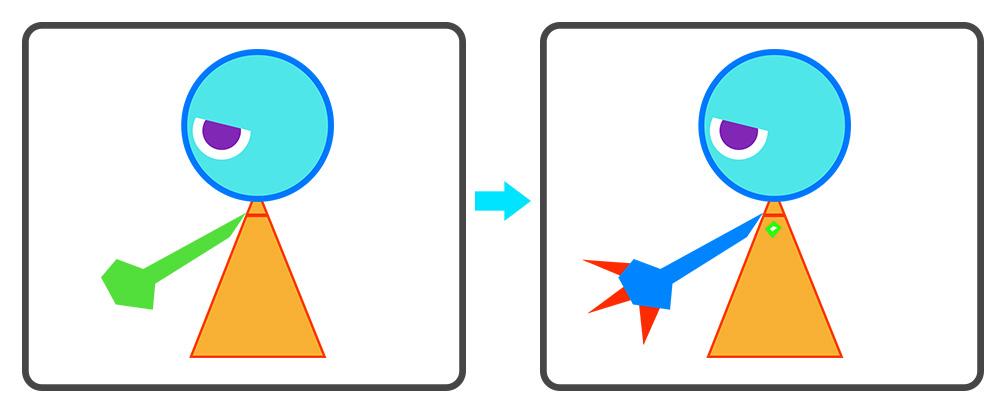
These are the PSD images prepared for this explanation.
To allow for horizontal flipping, the eyes and arms were drawn on only one side.
We plan to first create the character using the image on the left and then perform a re-import using the image on the right.
The key point is that these PSD files consist solely of image layers, without any folder structure.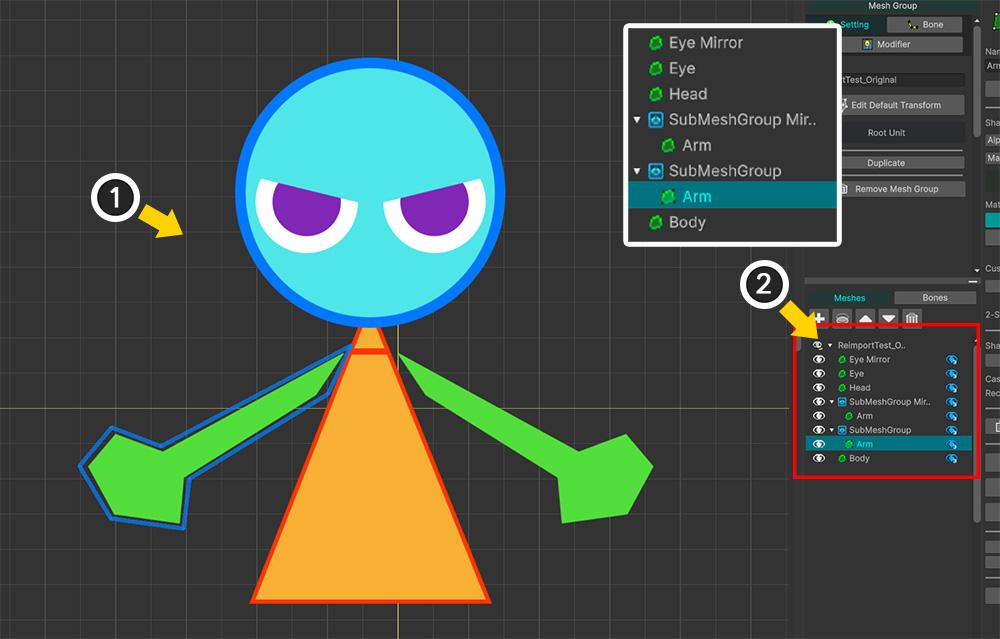
(1) This is a character created by importing the first PSD image into AnyPortrait.
(2) After creating an empty Sub Mesh Group, we “migrated” the arm mesh into it and duplicated that group to create the arm on the opposite side, as shown above.
We also duplicated the eye mesh to complete the pair of eyes.At this point, we adjusted the positions of the Sub Mesh Group and the Arm mesh.
(If the positions of the Sub Mesh Group and the Arm mesh are not changed, the bug will not occur.)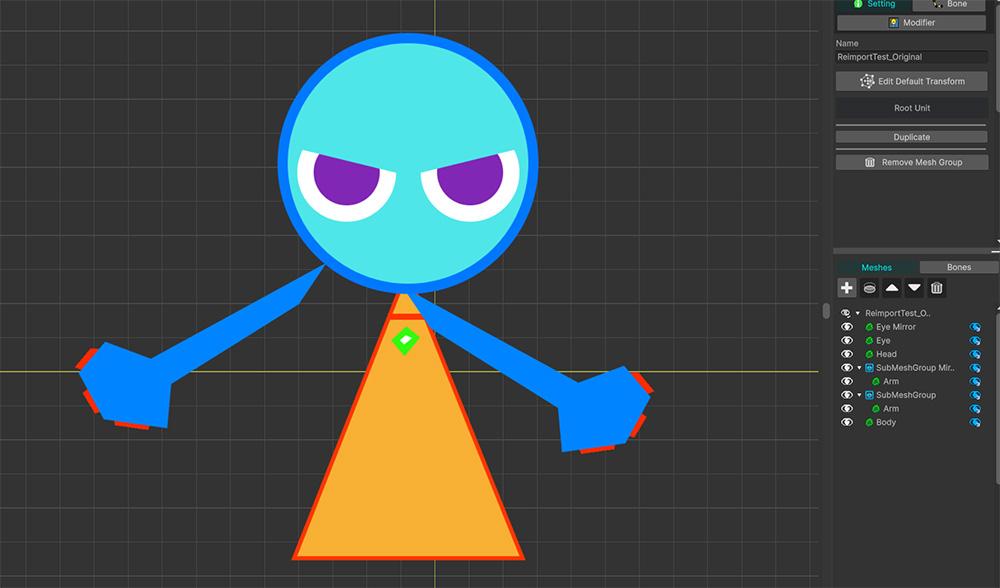
We then attempted to re-import using the second PSD file, following the existing method.
As shown above, the positions of the arm meshes shifted incorrectly.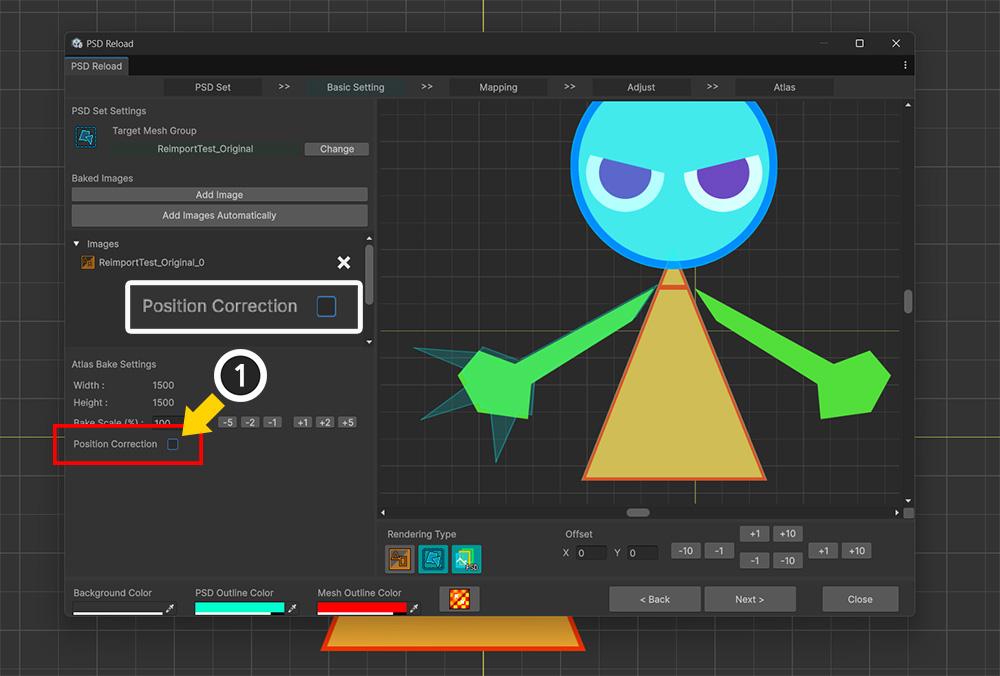
Let’s try re-importing to avoid any issues this time.
Open the original character file and run the PSD Reimport.
(1) You will notice the addition of a “Position Correction” option that wasn’t there before.
This option is enabled by default.
It adjusts the positions of the existing meshes to match the positions of the PSD images.
However, since we do not need this function in this instance, let’s “Disable” it.Note:
This option is a temporary implementation.
The option’s name or details may change in the official update.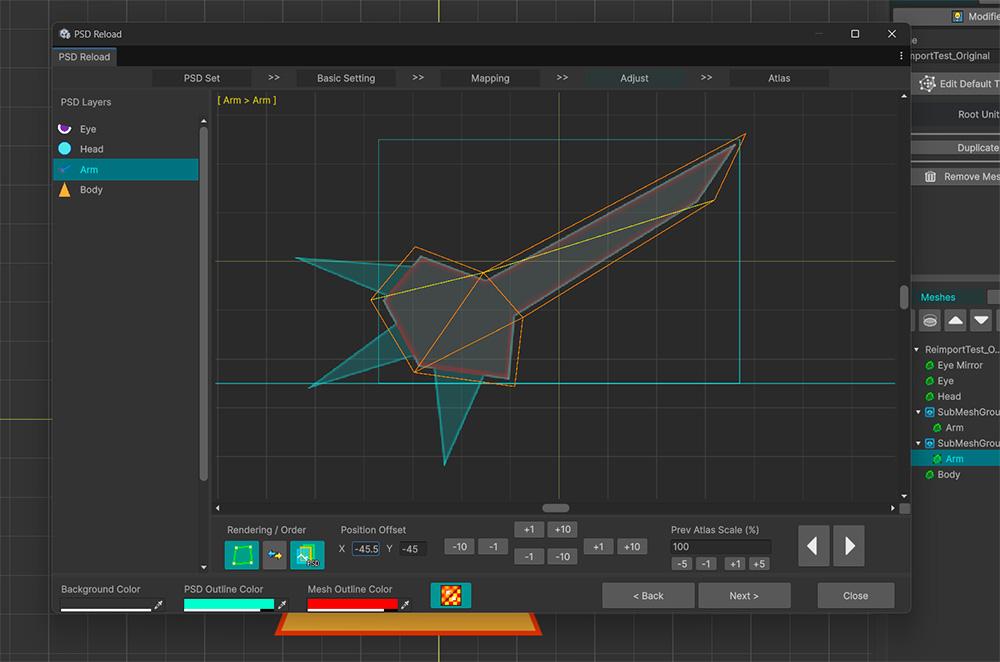
The subsequent steps for the re-import process are carried out in the same manner as before.
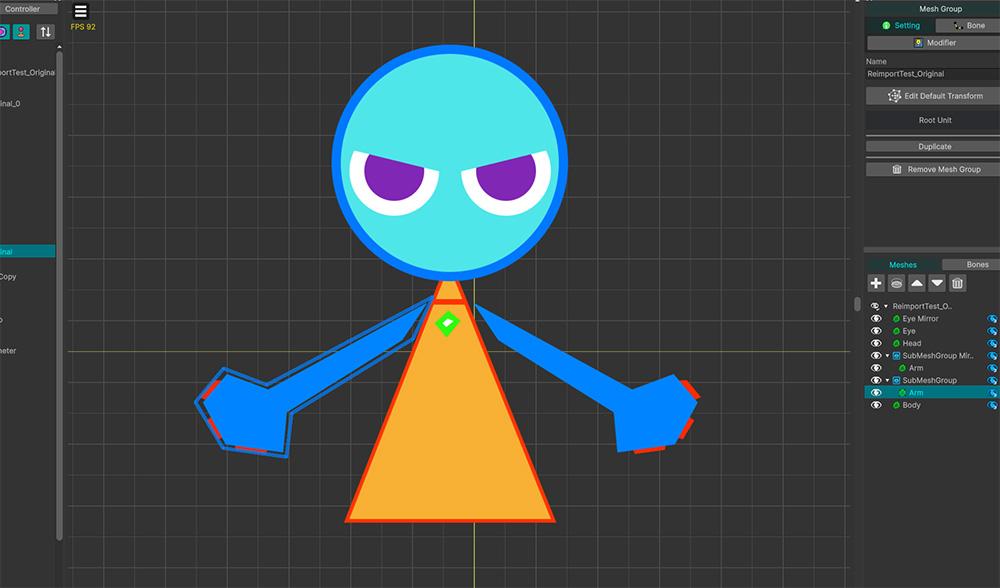
You can complete the reimport while maintaining the positions of the meshes as shown above.
————————————————————————————
We have only conducted brief tests after implementing the script to provide this answer, so other issues may still arise.
Additionally, if the cause of the problem differs from our assessment, the issue might not be resolved.
We recommend duplicating the original character for testing purposes.
If you do not have the original character, you might want to try restoring it using the “backup function.”(https://rainyrizzle.github.io/en/AdvancedManual/AD_Backup.html)
However, we have not been able to identify the cause of the data error that occurred after moving the content to the new project.
Please let us know if you need further assistance with this issue.If the problem is not resolved, please leave a comment!
Thank you.October 2, 2026 at 11:24 am #1636Hi!
Thank you for your quick help, the package you made seems to be working as intended!
However I do need to keep one folder for every direction in my PSD file. Otherwise every new image gets added to the root MeshGroup, and when I migrate them to the correct sub MeshGroup everything seems to break. My controllers weren’t working properly, but since I promptly undid my action, I don’t know if anything else was broken.
The best course of action for me would be to make a new character and apply all the advice you just gave me for clean start. Unfortunately we are too far along in the production of our game, I don’t think I can’t afford to do that 🙁
But by keeping one folder for each direction and adding each new image in the correct direction folder in my PSD file, the only thing moving as I re-import are the sub MechGroup for each direction (which makes sense as they are the only folders remaining in the PSD file). And it’s not much trouble moving 2 MechGroups by hand as opposed to all the ones I had to move before.
Thank you again for your help! I’ll be sure to keep my character hierarchy cleaner next time so I don’t encounter this issue again, thanks to your fix!
October 2, 2026 at 11:34 am #1637RainyRizzle
Hello.
We are glad to hear that our assistance was helpful.
However, we apologize for the inconvenience caused; we wish we had been better prepared with a way to fully restore your previous work.
Please let us know if you encounter any further issues or need anything else in the future!
Thank you.October 7, 2026 at 11:45 pm #1667RainyRizzle
Hi!
AnyPortrait has been updated to v1.7.0.
The issue you reported has also been addressed in this update.
Details regarding this are covered in the manual below.
https://rainyrizzle.github.io/en/AdvancedManual/AD_PSDandExistingObjects.htmlThank you for the information.
Please let us know if anything else is needed!
Thank you. -
AuthorPosts
- You must be logged in to reply to this topic.