
AnyPortrait > Forum > Bugs or Suggestions
Free Form Deformation (FFD) should be improved
- This topic has 2 replies, 2 voices, and was last updated 3 weeks, 3 days ago by
 RainyRizzle.
-
AuthorPosts
-
March 14, 2026 at 10:31 pm #1590
 DryreL
Hi RainyRizzle,
I hope you are doing fine!
I’m encountering some issues while working with FFD. It’s not a bug, but a missing feature.
1) FEATURE REQUEST: Adjustable Segment Count
AnyPortrait’s FFD has 9 vertices. And I think it’s not enough for advanced cases.

Photoshop example:
16 vertices default. More control.

And the best thing is:
You can add more segments by pressing CTRL button and clicking the area you want.

2) FEATURE REQUEST: Adjustable Anchor Point & Rotatable FFD
As you can see in the image, the mesh is “rotated” by default. However, FFD allows me to edit it as if it were flat. It doesn’t behave in accordance with the rotation. This is a real problem. When I want to rotate the wings, the anchor point should be provided via FFD. (Note: I’m not talking about the anchor point that can be set in the mesh section, I’m talking about having a local anchor point when morphing and recording with FFD.)


When I select the entire vertex, it automatically places the anchor point in the center. But I want it to be on the right end of the wing.
—
This is just a simple example I gave using the wing.
My main reason for bringing this up is due to a much more complex situation. Imagine a character; just in the head mesh, there are eyes, eyelashes, pupils, detailed layered hair, multiple mouths, ears, expressions, etc., and to give this head the feeling of being turned to the right, I need to use FFD, and it’s almost impossible to manage. The head is slightly tilted by default, and when I drag it to the right or left with FFD, it looks disproportionate.If we could rotate the FFD and able to add more segments, it could offer us more accurate adjustments.
Here’s a preview (I made this to quickly show you from Photoshop).
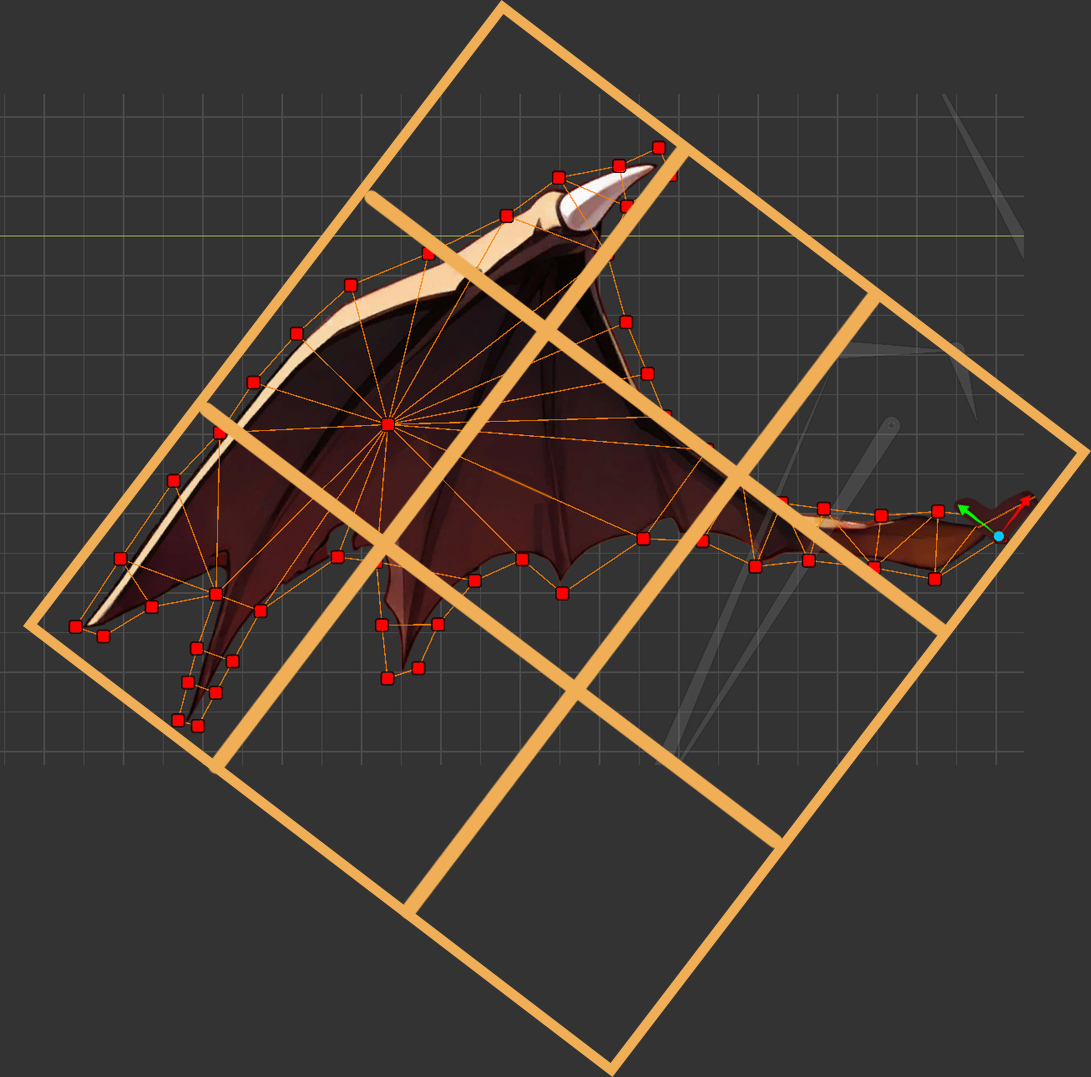
—
Thanks in advance!
March 14, 2026 at 10:33 pm #1591DryreL
I’m leaving the wing PNG file here in case you want to test it on your own computer
 March 15, 2026 at 6:31 am #1593
 RainyRizzle
Hi!
Thank you for your valuable feedback regarding FFD.
We will respond to each of your suggestions.1. Adjustable Segment Count
While not as sophisticated as Photoshop, it is possible to change the control points of the FFD.
Press and hold the Ctrl key (Command key on Mac) while clicking the FFD button.
This allows you to change the number of control points before activating the FFD.https://rainyrizzle.github.io/en/GettingStarted/GS_1_8.html
2. Adjustable Anchor Point & Rotatable FFD
We agree with the need for a feature to move a anchor for rotation or scale editing when editing vertices.
Although this issue has been pushed back due to the lower priority of other important tasks, we also believe it would be beneficial to implement it if possible.Next, we would like to offer our opinion on the suggestions for improving FFD.
Since FFD edits based on a rectangular frame, this tool is not useful depending on the shape.
In this case, rotating the FFD might allow for suitable use, but for other shapes, even rotating the FFD would not be sufficient.
Therefore, to overcome the limitations of FFD, we implemented a tool to assist the Morph modifier in a completely different way.Unlike FFD, “Pins” are tools that assist with curve-based vertex morphing.
Users can create Pins and the connecting curves in advance to match the mesh shape, and then use them in the Morph modifier to easily and quickly modify the shape.
Unlike FFD, this is implemented as a continuously usable element rather than a temporary tool, so it will be of great help to you once you become familiar with it.
Of course, you can also use Pins in conjunction with vertex morphing.
Please read the following manuals.– Adding Pins : https://rainyrizzle.github.io/en/AdvancedManual/AD_AddPin.html
– Using Pins in Morph modifier : https://rainyrizzle.github.io/en/AdvancedManual/AD_PinMorphWork.htmlAs we are currently focusing on implementing other features, it may be difficult to improve vertex morphing in the near future.
However, we have noted this suggestion and will use it as a reference for future improvements.
Thank you for your valuable feedback. -
AuthorPosts
- You must be logged in to reply to this topic.