
AnyPortrait > Forum > Bugs or Suggestions
Error of Changed Scene fix
- This topic has 3 replies, 2 voices, and was last updated 3 weeks, 2 days ago by
 RainyRizzle.
-
AuthorPosts
-
March 14, 2026 at 9:56 pm #1589
 DryreL
Hi RainyRizzle,
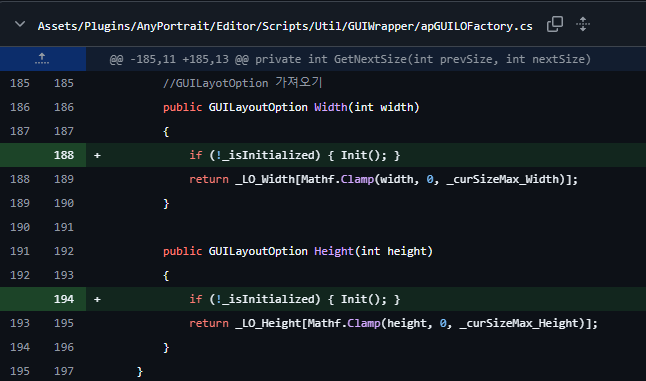
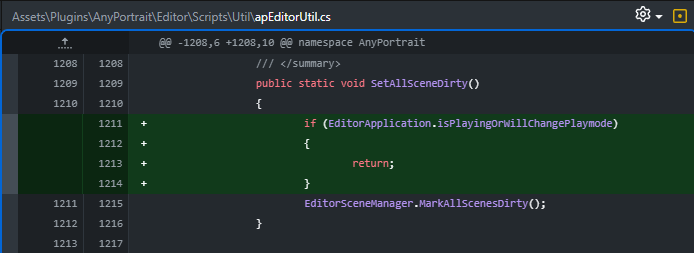
I’m sharing the solution to the “Error of Changed Scene” error that I keep encountering.
Critical 2 fixes:
Assets/Plugins/AnyPortrait/Editor/Scripts/Util/GUIWrapper/apGUILOFactory.cs
Assets\Plugins\AnyPortrait\Editor\Scripts\Util\apEditorUtil.cs
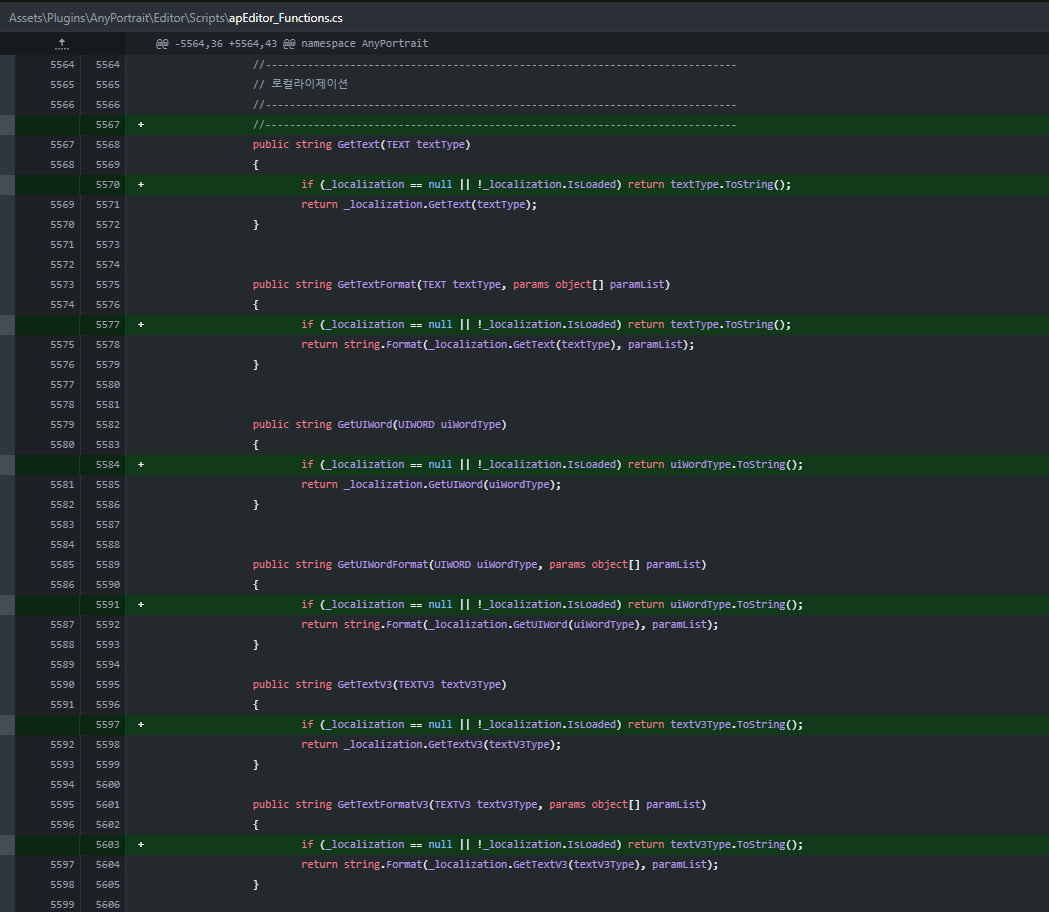
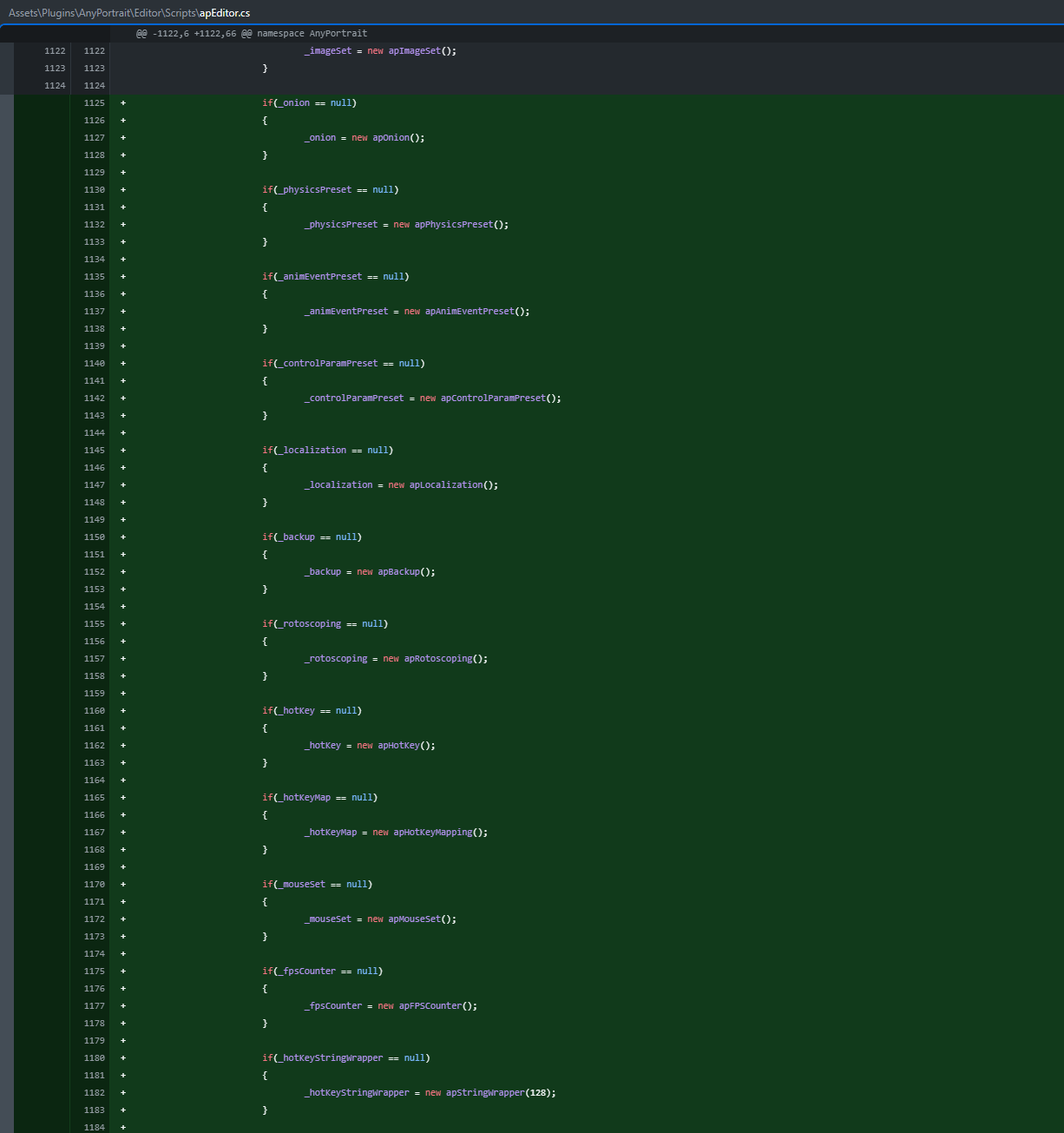
Optional but recommended:
Assets\Plugins\AnyPortrait\Editor\Scripts\apEditor_Functions.cs
Assets\Plugins\AnyPortrait\Editor\Scripts\apEditor.cs
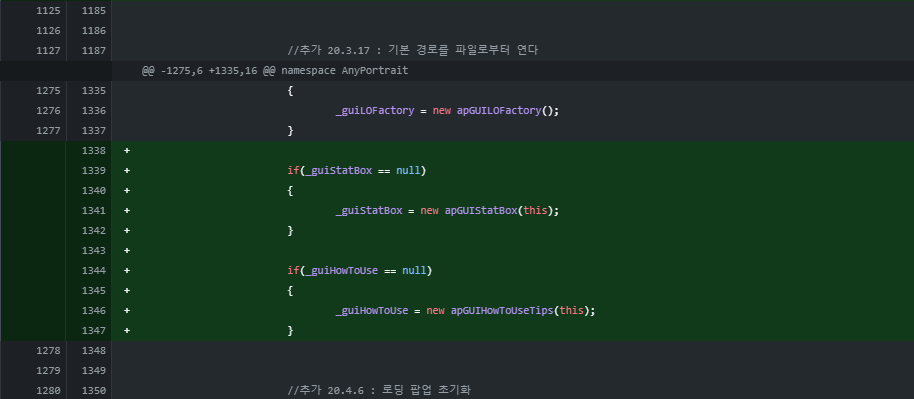
Hope it helps. I can send the scripts directly if you want, just let me know 🙂
March 15, 2026 at 5:18 am #1592 RainyRizzle
Hi!
Thank you for letting us know about the problem and the solution.Although we have significantly improved the error that occurs when the scene being edited in the Unity Editor changes, the issue is recurring in specific situations.
We have read your post and conducted tests, confirming that the problem you described occurs in the following scenario:1. Dock the AnyPortrait Editor in the Unity Editor.
2. Activate another docked UI in the Unity Editor to hide the AnyPortrait Editor.
3. Run the game once.
4. Change the scene.
5. An error occurs.It appears that when the editor is deactivated while docked, its operation temporarily freezes, preventing some resources from being reinitialized.
We do not believe this issue is critical, but please let us know if the problem occurs in a situation different from what we have verified.
We will resolve this issue in the next update, including the code you provided.
Thank you.P.S.
It appears that you have placed AnyPortrait in the “Assets/Plugins” folder.
While placing AnyPortrait in other folders is acceptable, folders named “Plugins” or “Editor” are not recommended because they play a special role in Unity.
Placing it in folders with these names changes the build order, which may lead to unexpected issues.
Please refer to the following document for more details.https://docs.unity3d.com/Manual/script-compile-order-folders.html
March 15, 2026 at 8:40 am #1594DryreL
Yes, this is exactly the scenario how I’m getting error:
1. Dock the AnyPortrait Editor in the Unity Editor.
2. Activate another docked UI in the Unity Editor to hide the AnyPortrait Editor.
3. Run the game once.
4. Change the scene.
5. An error occurs.—
I’m quickly testing the AnyPortrait (it is always docked on my workflow, next to Scene tab). I’m double clicking AnyPortrait dock to fullsize. Any double click again to minimize. This way it’s more quicker to fullscreen/minimize instead of manually opening with Tools > AnyPortrait > Editor etc…
I use the Scene Switcher plugin to quickly switch scenes. I can also quickly switch scenes using the Docked window (it’s not related with error, same functionality, this way it’s only in Inspector window instead of Project folders window)
I think it would be good if you implemented this fix in the next update. You know, I brought this up a year or two ago. Seeing the red “Error of Changed” message constantly on the Log screen didn’t bother me at first, but now it’s becoming very annoying. Because it’s ALWAYS happening.
By the way, I keep all my plugins in the Plugins folder, including AnyPortrait. Honestly, I haven’t encountered any problems so far due to them being in the Plugins folder. Since there are already a lot of folders besides the Plugins folder (in my project), and because I’m particular about order, I think it’s better for me to keep it in the Plugins folder. However, if there’s a very critical situation and it absolutely shouldn’t be in a subfolder, please let me know.
March 15, 2026 at 11:32 am #1595RainyRizzle
Hi!
Thank you for leaving a comment.Docking custom editors are highly susceptible to bugs in terms of resource management.
Unlike standard detached editors, there are many cases where they behave strangely.
For example, when a docked editor is maximized and then restored, it appears internally that a “cloned ghost editor” has been temporarily created; there was a bug where resources were forcibly released by this ghost editor. (This issue has now been resolved.)Unfortunately, however, the Unity documentation does not provide detailed information about this issue or offer appropriate APIs.
Therefore, to resolve docking-related issues, we must review reported problems individually and address each cause accordingly.
We will handle this issue appropriately as well.The following concerns the “Plugins” folder.
Since the name “Plugins” is used in other programs as well, it is considered a good name for storing external assets.
However, in Unity, if you place assets into a folder named “Plugins,” the scripts within that folder are built before other scripts.
If the build order is the same, the scripts can reference each other.
However, if the build order differs, scripts that build first cannot reference scripts that build later.Since most asset packages generally only reference their own scripts, the build order does not appear to be important.
It will usually not be a problem even if “user scripts” are built after “asset scripts.”
However, if there are scripts that reference external assets or functions, a compilation error will occur.
Therefore, Unity recommends placing “platform-dependent libraries” in the “Plugins” folder.
Generally, this applies to DLLs or C++ files used to call OS or Store functions that are unrelated to Unity.Occasionally, there are asset packages that contain an internal “Plugins” folder; this is because they have issues that are particularly sensitive to the build order.
Fortunately, AnyPortrait is relatively unsensitive to the build order except for “Editor,” so there are currently no critical issues.Storing assets in a specific folder is a good management practice.
However, when placing assets in folders with special names, it is recommended to be mindful of their characteristics and follow Unity’s guidelines.
If there are no immediate issues, it is fine to leave them as they are, but please keep in mind that compilation problems related to the build order may occur.
Thank you. -
AuthorPosts
- You must be logged in to reply to this topic.