
AnyPortrait > Forum > Bugs or Suggestions
Look At works wrong when it is a part of IK chain
- This topic has 6 replies, 2 voices, and was last updated 3 months, 3 weeks ago by
m00nk.
-
AuthorPosts
-
April 26, 2026 at 6:23 am #1596
Hello.
I want to create the robot’s arm, control it’s position via IK. I’m going to control the position and the direction of the arm in animation via 2 “control” bones: IK Pos and IK Look At. So I need the Tail bone to be placed to the position of IK Pos bone and the Hand bone to be pointed to the IK Look At bone.
I have created IK chain:
- the head is Leaf1 bone (orange)
- IK target set to Tail
- Tail’s settings:
- IK control Settings == Position
- Effector Bone == IK Pos Target
- Default FK/IK Weight == 1
- Hand’s settings:
- IK control Settings == Look At
- Effector Bone == IK Look At
- Default FK/IK Weight == 1
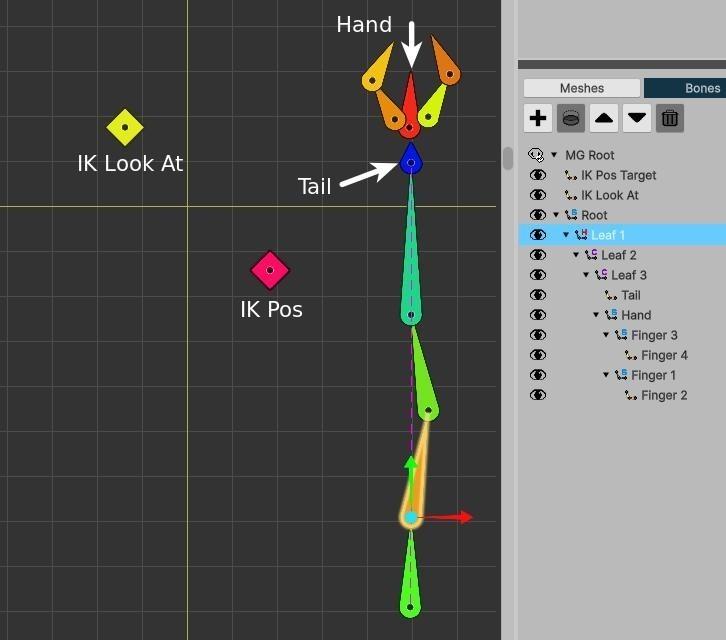
The problen is the Hand bone angle is wrong:
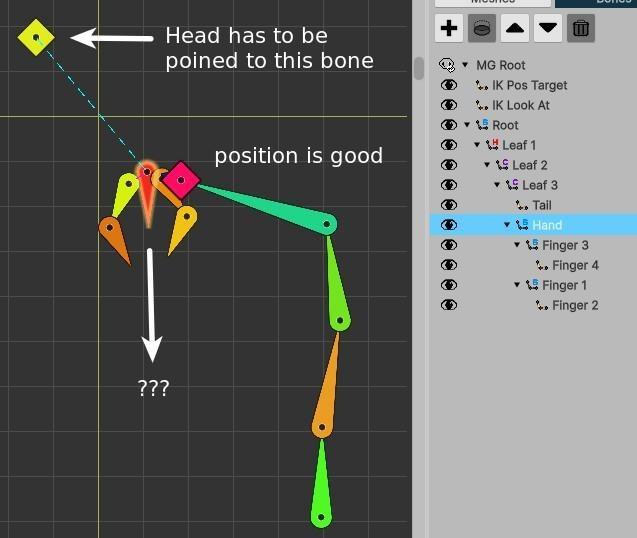
The Hand‘s angle calculated good (pointed to IK Look At bone) if I set the value of “Default FK/IK Weight” for the Tail bone to zero, or if I set the parent of Tail bone to None. But if Tail is the part of active IK chain, the Hand poined to the wrong position.
How can I fix this behaviour?
April 26, 2026 at 11:12 am #1597 RainyRizzle
Hi!
We confirmed that the issue you reported is indeed caused by a bug.
We sincerely apologize for the inconvenience caused by this bug.
We will review this issue further and fix it in the next version.First, we would like to explain how we can resolve this issue in the current version.
If you have configured an IK controller using the “Look At” method on a single bone, it is possible to replace it with the “Position” method.
We will explain the process for resolving this issue as follows.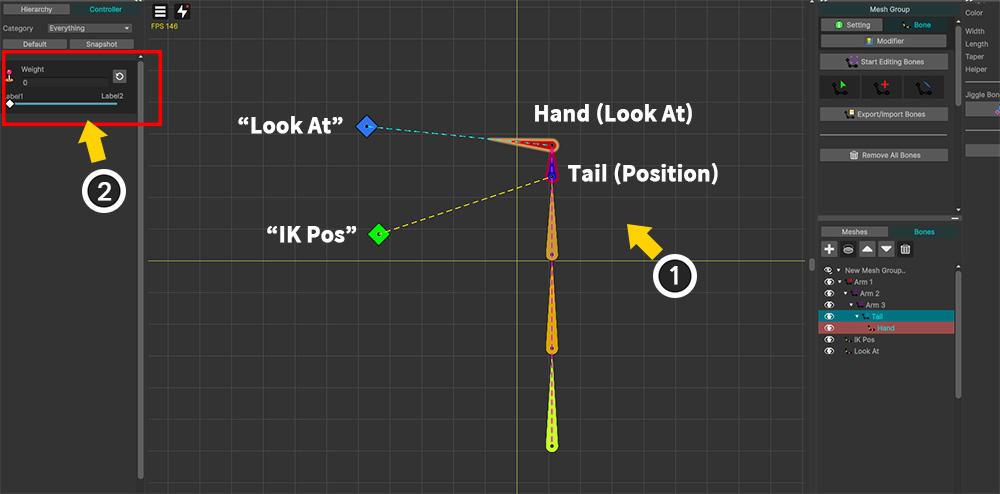
We have reproduced the issue you reported in a similar manner.
(1) We applied a “Position” IK controller to the “Tail” bone, which is composed of an IK Chain, and a “Look At” IK controller to its child “Hand” bone.
(2) For testing purposes, we configured the IK controller on the “Tail” bone so that its weight changes based on control parameters. (This is not essential.)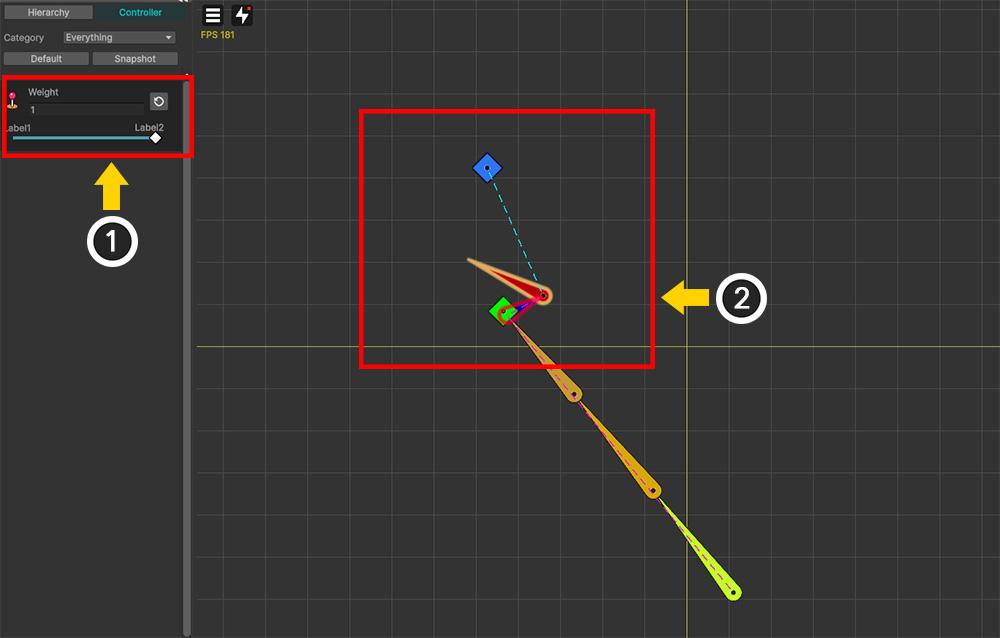
(1) Adjusting the control parameters changes the weight of the “Position” IK controller of the “Tail” bone.
(2) When the “Position” IK controller is functioning correctly, a problem occurs where the “Look At” IK controller of its child bone does not function properly.This is indeed a bug, and an alternative method should be applied to resolve this issue.
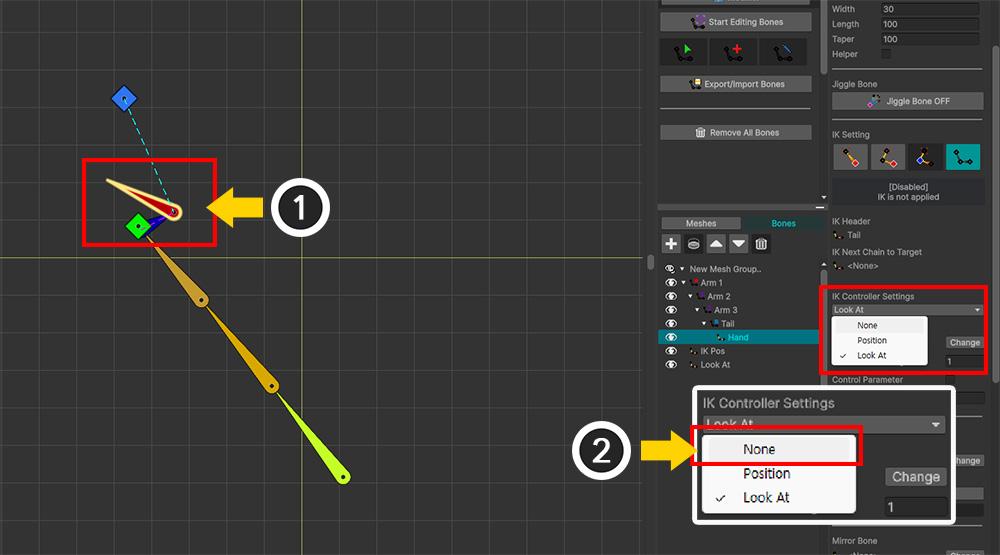
(1) First, select the “Hand” bone to which “Look At” IK is applied.
(2) Disable the IK controller by changing the IK controller mode from the existing “Look At” to “None”.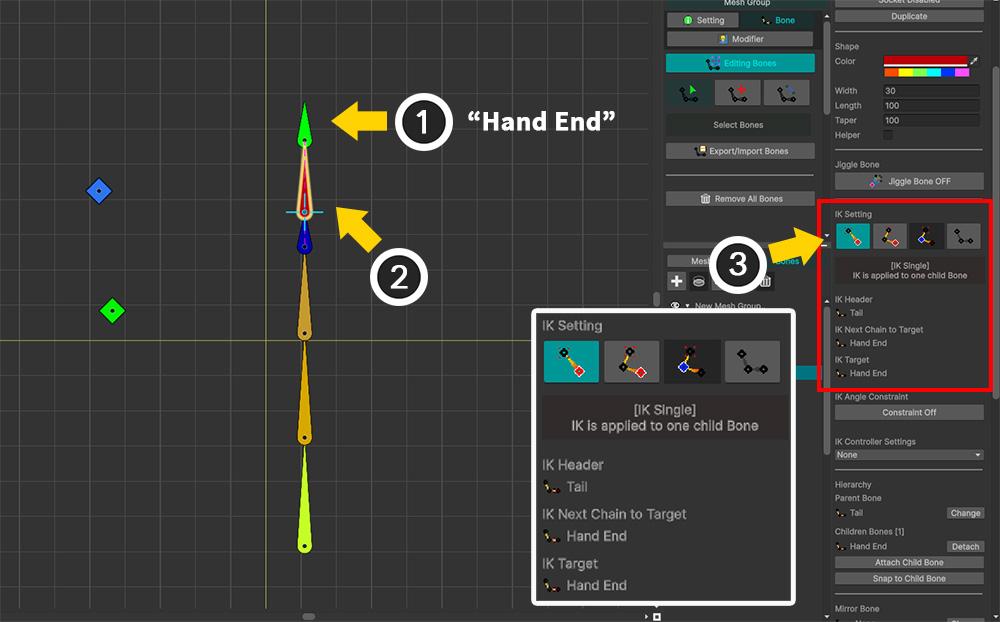
(1) Add a new child bone to the “Hand” bone. Here, the name of the new child bone is set to “Hand End”.
(2) Select the “Hand” bone.
(3) Set the IK settings of the “Hand” bone to “IK Single” or “IK Chain” to configure the IK Chain targeting the newly added “Hand End” bone as described above.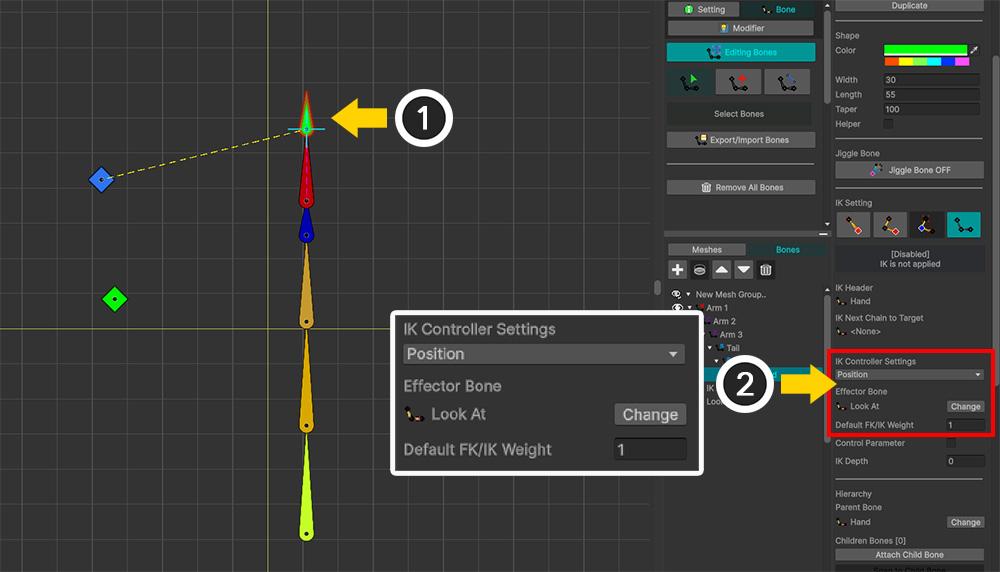
(1) Select the “Hand End” bone.
(2) Set the IK controller to “Position” mode and position it to face the “Look At” bone. (Set the Default Weight to 1 as well.)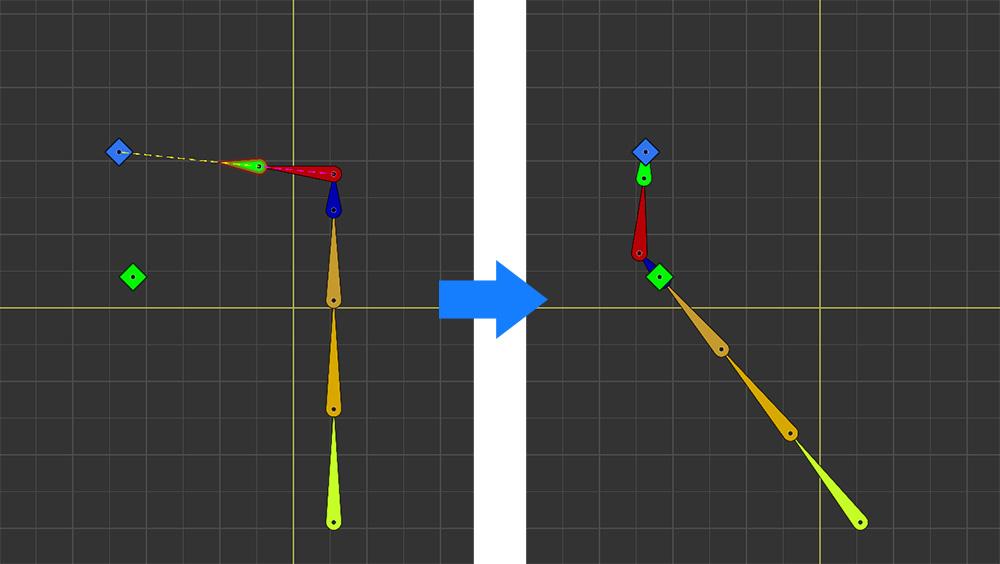
The “Position” IK controller in a single chain operates just like a “Look At”.
Using this method, the problem can be solved as described above.Once again, we sincerely apologize for the confusion caused by the bug.
If the issue persists, please leave a comment!
Thank you.April 27, 2026 at 5:22 am #1598Hello.
Thank you for the respond. I hope the fixed version will be released as soon as possible.
Also I have some idea.
Based on my experience usual the last bone in chain (like Tail in the examples above) uses as “position pointer” and does not use for the deforming any meshes. So it can be freely rotated and used for “Look At” too.
I think there is possible to remove the “IK control Settings” dropdown, change the title of Effector Bone” to “Position Effector” and add field “Look At Effector” for every bone.
- If both fields (“Position Effector” and “Look At Effector”) are empty, the bone works the same way as when “IK control Settings” == “None” in currrnt version.
- If fields “Position Effector” has value and “Look At Effector” is empty, the bone works the same way as when “IK control Settings” == “Position” in currrnt version.
- If fields “Position Effector” is empty and “Look At Effector” has value, the bone works the same way as when “IK control Settings” == “Look At” in currrnt version.
- If both fields have values, the bone works the same way as when “IK control Settings” == “Position” and rotates to the necessary direction at the same time.
So in the examples above the Tail bone is not necessary any more – the Hand bone will be able to do the both actions.
What do you think?
PS
Sorry for my english, it is not my natural language.April 27, 2026 at 5:33 am #1599RainyRizzle
Hi!
Thank you for the good suggestion!The idea you shared seems easy to implement and quite useful.
We will positively consider applying it.If we were to actually implement this, it seems unlikely that we would remove “Look At” from the IK Controller method.
If “Look At” IK is applied to the IK Chain, it operates differently from the Look At of a single bone, so it has a unique role.We will review the possibility of additionally implementing a method that designates two Effectors, and if there are no major issues, we will try to apply it in the near future.
Thank you again for sharing such a great idea.
May 6, 2026 at 1:05 am #1600Hello.
Can you provide an approximate release date for the next release that will fix the bug described?
Thank you.
May 6, 2026 at 1:09 am #1601RainyRizzle
Hi!
We are currently facing difficulties with the addition of other new features that are still under development.
Additionally, due to internal circumstances, it will be difficult to specify an update date.We apologize for not being able to provide a satisfactory answer.
May 6, 2026 at 10:10 am #1602Hello.
That’s ok. I just had to make a decision – to make animations through “fake” bones (as you described above) or to wait a little until the next release, where everything will work correctly.
-
AuthorPosts
- You must be logged in to reply to this topic.